
In this article:
Work Order statuses explained
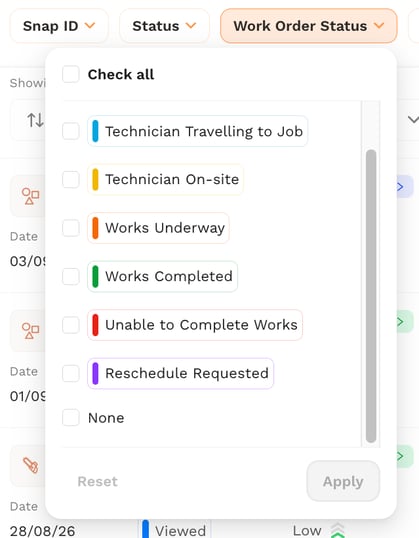
A Work Order can be in one of seven statuses:
- Works Scheduled - When a Work Order is first created and assigned to a technician but has not been started yet.
- Technician Travelling to Site - When the technician has started a Work Order and indicated they’ve travelled to site.
- Technician on Site - When the technician has indicated that they are on site.
- Works Underway - When the technician has indicated they’ve started works.
- Works Completed - When the Work Order has been marked as completed.
- Unable to Complete - When the work has been marked as unable to complete.
- Reschedule Requested - When the technician has a requested the Work Order to be rescheduled.
Viewing the status of a report
- Open the Reports list or board.
- Find the current Work Order status shown on the top left of the report card.
- Click the status to jump directly to the linked Work Order.
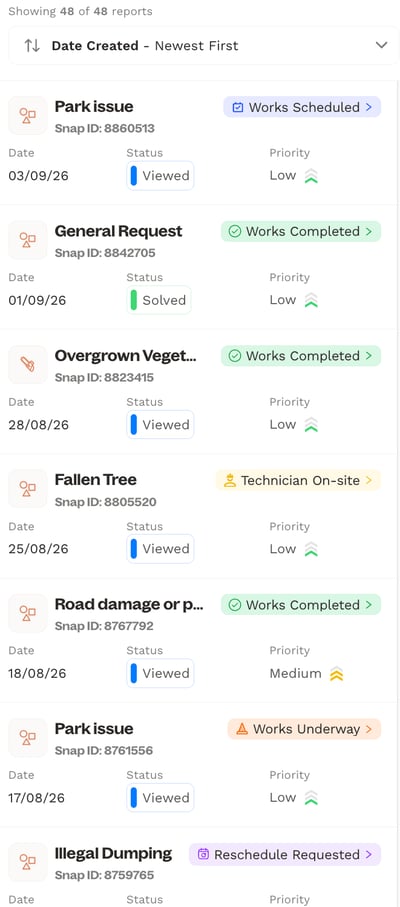
You can also filter reports by Work Order Status to view specific reports and their current state.
Note: The Work Order Status is independent of the Report Status - updating one does not change the other. Check both if you need the full picture on a report.
Summary
You can now follow a Work Order's progress from Scheduled through to Completion directly from the report card.